Monday, October 28, 2013

Blog Quest 1: Emotional Contagion

When talking about stories within a game that gripped me or moved me emotionally, the first one comes to my mind is the story line of Ishida Mitsunari in Samurai Warriors 2. Samurai Warriors 2 is a game took place at Sengoku period in Japan. Player can choose to be one of the about 30 characters to fight their battles. Each of the character has his/her own story line and legend, most of them are created according to the Japanese history. The game featured with very fantastic animations to keep player's attentions and enjoy to being the hero they have chosen.

I am not easily moved by a game story, but when I am,  I would be upset for few days.
Ishida Mitsunari is my favorite character in this game and also in Japanese history. There are only five characters for player to choose in the beginning, and we can activate the rest of the characters by playing throughout those five basic character's legend. At the first play, I chose to be Ishida Mitsunari because he has red hair and used a fan as his weapon. The story of each character mostly based on the Japanese history, unless you won the battles which the character was supposed to lose in history. The design of the character also gives the player lots of  passions because the designer has beautify them a lot, this is a great advantage in the Japanese games. However, since this is a Japanese game, the characters and most of the texts are written and shown in Japanese, this language barrier limits the fun for players who don't know Japanese.


Ishida Mitsunari

The story of Ishida Mitsunari

Ishida Mitsunari was a Samurai and also Daimyo during the Sengoku period in Japan. In the game, he served Toyotomi Hideyoshi as his lord,  assisted him to unify Japan by giving him suggestion to fight the battles. Ishida Mitsunari also met his best friend Naoe Kanetsugu in the story. After his lord's death, he decided to fight against Tokugawa Ieyasu as the result between their conflicts. He asked Naoe for help and Naoe decided to support Ishida even though they didn't have a big chance to win. In Ishida Mitsunari's whole life, he kept pursuing an aim "Man for me, I for all, peace and harmony." He even created an emblem for his belief, and player can see this emblem everywhere in his battles. There was a battle called Battle of Sekigahara, it was the last mission before the end of his legend and it was a very important battle for Ishida Mitsunari. By winning this battle, player can then unify Japan, and Ishida Mitsunari will become the governor of Japan. However, this still not the part that moved me the most.
Man for me, I for all, peace and harmony
By playing through his legend, I believe player would certainly know much more about his characteristics and contributions to Japan. Although he is a really good fighter in the game, he lost the Battle of Sekigahara in the real Japanese history. I felt very glad that I played his legend first, because in the rest of the legends in the game, he gotta die! In every other character's story which related to Ishida Mitsunari, he lost the Battle of Sekigahara like Japanese history, and was beheaded in Kyoto. When I played through his best friend Naoe Kanetsugu's legend, I moved the most by the game story.

Naoe Kanetsugu tries to kill himself after he got the message of Ishida Mitsunari's death.
Naoe tried Seppuku when he knew that his best friend was beheaded, but it was stop by the other guy. The guy dissuaded him by saying that he should protect and keep Ishida Mitsunari's spirit rather then just die for nothing. He then picked himself up and his story continued. After that, I felt really sad and replayed Ishida Mitsunari legend few times the following days. Although the most touching part was not in the main Ishida Mitsunari story, but by watching the marvelous animation cut scenes with the dubbing, it really made me fell into the game story. A good story is really important for a game!

Thursday, October 17, 2013

INFR 3110 Blog entry 5

As we tried to install the twoloc engine to Visual Studio 2010 last week tutorial, we encountered millions of problems and errors. After re-cloning and re-installing several times of the dependencies and the engine, I finally got the ogre samples work. However, when I tried to generate a new program with the generator, it still comes with error.

Why...?!
To solve this, I then go to the debug folder to look for the .exe file and certainly it wasn't there. But then I found it in the ..\bin\Debug folder instead of ..\Debug, so I simply copy and paste the .exe I have found into ..\Debug. I thought it was going to be worked, but NO.

What..?
I'm not going to reinstalling the program anyways. I sat there and felt frustrated for about 20 minutes. I tried a few methods but still not working. Later, I rechecked the bin\Debug and there is vld_x86.dll. How come I didn't see it? Finally idea pops up then I copy  the whole thing in the ..\bin\Debug folder and paste them into Debug. 

Guess what? It magically works.  

No, Visual Studio is magic tool.
Now I can finally work on the homework question with VS2010.


Game Design and Production II Lecture 4

System Dynamics

In the 4th lecture, we discussed about the system dynamics for game. There are four basic system elements: objects, properties, behaviors, and relationships. These elements determine how a system acts in motion and  guide interaction quality. As the following, I will use one of my favorite board games: Jungle Chess as an example.
Jungle Chess - Dou Shou Qi

Objects

Objects are the basic system building blocks. In the world of a game, everything basically formed by objects. They can be physical, abstract, or both. According to the lecture notes, the examples of the objects in game would be: Game pieces, In-game concepts, Players, Player representations, Areas or terrain. In Jungle Chess, the animals pieces, players, and the terrain would be the physical objects. The river, animals themselves, the den and traps would be the abstract objects of the game. Objects are defined by their properties, behaviors, and the relationships with other objects.

Properties

Properties determine interactions between different objects like what it can do, their where they should be placed, how they attack each other. Properties also define the qualities or attributes of objects like the size, color, rank hit points. In Jungle Chess, each animals pieces have different properties as shown below:


Rank - Elephant -> Lion -> Tiger -> Leopard -> Wolf  -> Dog  -> Cat -> Rat -> Elephant
Color - red, black
Position - each animal has specific location when start up the game as shown on the game board

Behaviors

Behaviors are the potential actions in a given state, but it can still be restricted by the rules. For example, in Jungle Chess each piece can move horizontally or vertically one space and move horizontally or vertically to capture a opponent's piece. Specific pieces also have its own behaviors like the lion and the tiger pieces can jump over the river squares, and the rat pieces can move into the water. In this game, there also some behaviors restricted by rules like the lion and tiger pieces cannot jump over the the river when there is a rat piece directly block that roll.

Relationships

"No relationships = collection, not system". Relationships are essential for a system and can be determined by chance and rule sets. Relationships always expressed as locations on game board and numerical sequence cards. In Jungle Chess, relationships expressed as locations on the game board. The water squares provide chance for pieces to jump over it, the trap squares provide chance for pieces in lower rank to capture pieces in higher rank, and the den squares provide chance for players to win the game. If there're no relationships in the system like board game with a blank game board, there would not be called as a game or system.

Monday, October 7, 2013

INFR 3110 Blog entry 4

Few weeks past, but I still can't figure out how to export coordinates from Maya to twoloc :(. Therefore, I tried to move on to another question that looks easier for me which does not required exporting keyframes.

Q4: Build a simple solar system out of textured spheres.

First, to make it easier, we can use the ProceduralSphereGenerator.h file to easily create a bunch of spheres.

#include "ProceduralSphereGenerator.h"

I got 24 errors after I include this thing... The way to solve it go to project properties and add these items:

Linker -> General -> Additional Library Directories:
$(TwoLoc_PATH)\lib\VS2008\$(ConfigurationName)\$(PlatformName)\OgreProcedural\

Linker -> Input -> Additional Dependencies:
OgreProcedural_$(ConfigurationName).lib

But...

This is for Visual Studio 2008!


Before we start, we need to know:
1) Ogre::SceneNode
2) Ogre::Entity

SceneNode is use for translating/rotating the object. Its basically the coordinates of an object.
Entity is the actual object, It can be a mesh, a fbx file, etc. we can only set the texture/material for an entity not the node.

First thing we need for this solar system is the sun. The sun is also the root node of the scene, it doesn't do anything(it's not spinning and no orbit). It's just a simple sphere, so we only need to create a sphere and attach the entity to the node.

//Declare the variables for the sun
Ogre::SceneNode *mRootNode;
Ogre::Entity *sun;

Since the sun is the root of this solar system and it does not spin and no orbit, we just make it the root node for the scene.

mRootNode = mMgr->getRootSceneNode();

Other than the sun, we have the earth spinning and rotating around the sun. For these kind of planet, we need to declare 3 scene nodes for each of them.

mEarthOrbitNode = mMgr->getRootSceneNode()->createChildSceneNode();
mEarthTranslateNode = mEarthOrbitNode->createChildSceneNode(Ogre::Vector3(5, 0, 0));
mEarthRotateNode = mEarthTranslateNode->createChildSceneNode();

mEarthOrbitNode represents the point it rotates around, mEarthTranslateNode represents it’s actual position while rotating around the root(the sun), mEarthRotateNode represents the point that the earth spins around/its local axis, and they are all attached in order.

Procedural::SphereGenerator().setRadius(1).realizeMesh(“earth”);
Ogre::Entity* earth= mMgr->createEntity(“earth”);
earth->getSubEntity(0)->setMaterial(Ogre::MaterialManager::getSingleton().getByName(“earthMat”));
mEarthRotateNode->attachObject(earth);

And then, we create entity called earth for the scene and set material for this entity. Finally attach it to the rotation node.

After creating the mesh, we still need to make it move and rotate as well. We can simply do this in the update function. First, declare variables control how the planet spin and its orbit. Then, use the setOrientation function to move the mesh.

mEarthSpin += 360.0f*dt * 5.0f; // every second is 5 days
mEarthOrbit = mEarthSpin/365.25f; 

mEarthOrbitNode->setOrientation(Quaternion(Radian(Degree(mEarthOrbit)), Vector3::UNIT_Y));
mEarthRotateNode->setOrientation(Quaternion(Radian(Degree(mEarthSpin)), Vector3::UNIT_Y));

Then, we copy and paste a bunch of codes to get this:


Sunday, October 6, 2013

Reverse Scröwdriver Crafting 2

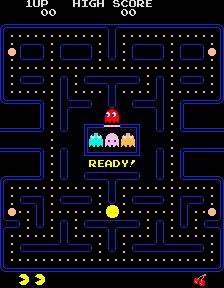
Pac-Man was a classic and simple game that appealed many people from different age groups. It’s an amazing game because of the simple programming and easy rules. The objective of the game is to eat all the Pac-Dots in order to complete the level and get into the next one. There are 4 enemies roaming around the maze try to capture Pac-Man. You will lose a life if you got touched by one of the enemies. The Pac-Man also has the opportunities to eat the enemies when Pac-Man eats the power pellets.


Rule: After Pac-Man eating the power pellets, the enemies turn deep blue, reverse direction and usually move slower. When an enemy is being eaten, its eyes remain and return to the center box where it is regenerated in its normal color.

Rule Change: After the enemy is being eaten by the Pac-Man twice, the enemy reduces its speed every time when it's being eaten.

How this changes the game: The game won't be running too crazy when getting in higher level. In higher levels, the time enemy turn deep blue will get shorter and it makes the game much more challengeable. By changing the rule, player takes the chance to scale down the hardness of the game and easier to keep the life. Also, it allows players to last their interests longer in playing this game.

Reverse Scröwdriver Crafting

Tetris is a very classic tile-matching puzzle game. Tetris is a game that has a random sequence of Tetriminos fall down the playing field. The objective of the game is to manipulate the Tetriminos to create a horizontal line without gaps; players can rotate and translate the Tetriminos by using the arrow keys and space bar on computer. When such a line is created, the line disappears and the blocks above the deleted line will fall. When a certain number of lines are cleared, the Tetriminos falls faster and faster. The game ends when the stack of Tetriminos reaches the top of the playing field or no new Tetriminos are able to enter.


Rule:  The Tetriminos falls faster when a certain number of lines are cleared.

Rule Change: When the player cleared 4 lines in one stack, the Tetriminos falls slower.

How this changes the game: This rule change can make the game more dynamic. By changing this rule, the game would not only be just increasing the speed and keep being more challenge. It lets player having chances to recover the mistakes they previously made or having more time to think of how to stack the Tetriminos. This changing may also maintain player's interest.

Saturday, October 5, 2013

Grind Quest: Objectives

1. Samurai Warriors series - killing enemies, level up and gaining new weapons


2. Dynasty Warriors series - killing enemies, level up and gaining new weapons


3. Kingdom Clash -  killing enemies and gaining resources


4. Castle Story - kingdom simulation


5. Dragon Story - dragon hatching simulation


6. Farm Story 2 - farm simulation


7. Candy Crush - puzzle solving and level up

8. Candy Blast Mania - puzzle solving and level up

9. Jewel Mania - puzzle solving and level up

10. Fruit Mania - puzzle solving and level up

According to the list above, there are three types of games that appeal to me: Action RPG (hack and slash), simulation games, and puzzle solving games. I think what I enjoy the most in playing games is having the special abilities to fight and do things that I’m not able to do in the real world. This is also the feeling that we can get from most games and the reason why people addicted in playing games. In the action RPG games like Samurai Warriors and Dynasty Warriors, I can enjoy the play of being a hero to protect my own kingdom and defeat the enemies. I also enjoy the feeling of being victory after I win a tough battle. Those feelings can all be found by playing Action hack and slash game. Samurai Warriors and Dynasty Warriors also feature gorgeous 3D graphics and animation, so that the players not only can enjoy the excitement of battle, but also the art and the feeling of being “in” the world.

The other reason that games appeal to me is that I can build or create business, city, kingdom and farm, etc. while I will not be able to do those things in the real life. Although I can buy and run a farm in real life certainly, sometimes we may not able to do that, because we don’t have enough money. Therefore, we can achieve this goal in those simulation games. Sometimes we just have the idea on a whim, after playing for a while you may start to lose the interest on the city or kingdom you have built. One of the benefits for playing simulating games is saving your money before you waste them in real life.

One more thing that I enjoy in games is to think, to think of how to win, how to solve the puzzle, how to set up your armies, how to attack other kingdoms, and etc. I had a sense of achievement through not only winning the battle or solving the puzzles, but also I am able to think deeply on how to succeed during the process, the process requires a lot of critical thinking skills, and then I achieved it successfully.